

Part of a series of devlogs I’m making for the Diorama Break Kickstarter.
When writing game code, a common issue that pops up is expressing things that take place across several frames, usually a series of events that need to take place in a set order (e.g. cutscenes). For those with just a vague familiarity with code, it might seem strange that this is a challenge. Code is just a series of instructions, right? Just write the sequence of events down like anything else.
Unfortunately, most code languages are meant to express a series of instructions that, when called, the computer runs immediately, as fast as it can. If you want to do something at time t, then something else at time t+1, then three more things at time t+2.5, just writing all those things down one after the other won’t cut it.
“Easy,” you say. “Just sleep between each instruction.” If this was the only thing the game was doing, that might well work, but keep in mind that the rest of the game has to run too. Sleeping would cause literally everything else to freeze while this random cutscene code did stuff, so that’s a no-go.
“Uh… threads?” you throw out. At this point I’m wondering how unfamiliar you really are… because sure, that’s not the worst idea. Running our code snippet on a separate “thread” allows us to run it in parallel with the rest of the game code, so no blocking necessary. However, this introduces a whole class of problems related to parallelization. We could painstakingly solve them for our use case, taking a bunch of steps to make sure the threaded code only runs exactly when we want it to, in the right order, and doesn’t update any variables at the wrong time and break things. This seems like a massive headache and needlessly complicated though. There must be a better way.
The Shape of the Solution
There’s one way in which the typical structure of a game engine is advantageous here. For those that need a refresher, most engines typically operate on a fixed loop; that is, they’ll do a certain amount of work for a “frame” (collecting user input, updating all the objects, rendering the game world, etc.), then wait until it’s time to do the same for the next frame. This means that everything happens on a fixed schedule. Most game code (after initialization) is called, say, 60 times per second, at precise intervals1. This gives us a precise timer we can use to do things at specific timestamps. By tracking when our cutscene code started being called (t), then calling it every frame, but only conditionally calling things at specific offsets (if current_time == t+10, t+30, etc.), we can get things to occur with precise timing! This is also a lot easier to slot in and control than threaded code; just put the cutscene’s function call wherever it needs to go in the game’s main loop.
With this structure in mind, I knew roughly how my system would be engineered, but then I got to the question of ergonomics. Procedural languages were not quite designed to easily express this stuff. Simply writing functions that track the time and using a bare series of conditionals might have worked on Antonblast’s few cutscenes, but resulted in a lot of boilerplate code which wasn’t super easy to edit. For a JRPG with tons of cutscenes like Diorama Break, this wasn’t gonna cut it. I had a couple of options in front of me:
Write a GUI cutscene editor. This would be a timeline-based editor where code events, animations, dialogue, and more could be arranged as I pleased. The result would be saved to data, basically a series of timestamps and corresponding events, that could then be “run” as described above.
Write a “cutscene language”. This would be a specific language designed to express cutscene events, along with a corresponding interpreter, similar to the custom markup language I made for the dialogue system.
Neither of these options appealed to me though. They both would require a lot of work, both to make the tool and then have to continuously maintain and integrate it with the rest of the engine systems. I needed cutscenes to be fairly general-purpose, which would involve using many engine features and touching tons of game state. In both cases, it means I’d need to “expose” a lot of the engine to these systems, which is effortful and error-prone. And remember, writing code for things that happen over time is a fairly general problem. Making a tool too specialized for cutscenes might mean losing out on something that could be applied elsewhere (such as complex visual effects, combat animations, menu transitions, etc.)
I therefore opted to take a middle-ground approach: create a library that would make this sort of code easy to express directly in the game code.
The System
I decided to call this the “Sequence” system, partly after Game Maker’s equivalent (which does use a GUI editor, i.e. a completely different method to solve the same problem) and partly because it’s a good descriptor for what the system is built to express (“sequences of events”).
Let’s take a look at how a simple sequence is expressed using an example from Diorama Break’s first cutscene:

Here, we’re defining a procedure that will get called continuously by the cutscene system until, when it’s done, it returns true (which gets placed in a map, so it can be easily accessed by name by said cutscene system).
A sequence is defined in a block that starts with seq_open, which sets the sequence “context”, and must end with a call to seq_close. When seq_open is called for the first time, it uses the caller location as a “key”2 into a global map of all sequence data to keep track of the sequence’s “current time”. Every time seq_open is called, the same caller location is used to retrieve the correct sequence context.
Within the sequence, seq_cue is the basic way to make things occur on, well, cue. The function returns true when the sequence time is equal to the passed frame time. In this case, a knock sound plays at frame 50 and frame 64, then the sequence ends on frame 180 (3 seconds in).
I can also pass a range to seq_cue, which will cause it to return true on every frame in that range. It also sets a global variable which can be used to get the percent “progress” of that cue, useful for changing things smoothly over time:

There are, then, three ways to close a sequence:
Normal: The default. Increments the sequence’s timer by 1, then resets the sequence context.
Pause: Same as above, but doesn’t increment the sequence timer. This will cause the sequence block to run with the same time value the next time it’s opened.
End: Called when the sequence is over. Frees up the sequence’s data in the global map, causing it to be created “fresh” the next time the sequence is opened (e.g. if a cutscene runs again at a later time). When called this way, returns true, mostly as a bit of syntactic sugar.
Nesting Sequences
This is a great start, but to really take the system to the next level, I set it up so it’s possible to nest sequences. That is, calling a sequence while inside another sequence. This makes sequences way more composable and reusable. Here’s a very simple example:
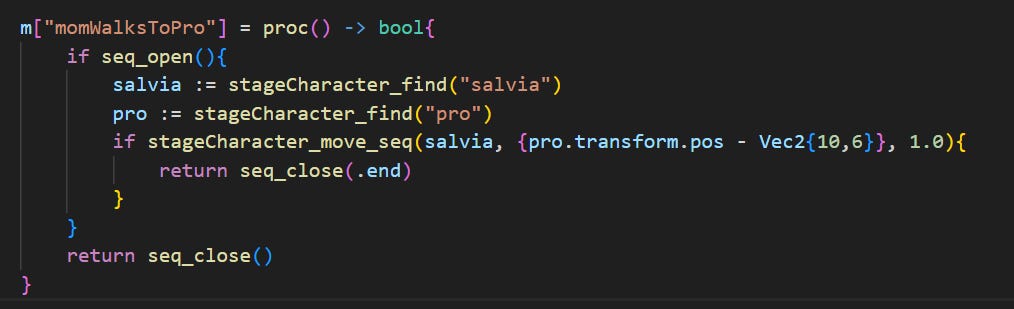
This simple cutscene just has a character walk up to another character. But it does this by calling into another sequence procedure, which will only return true (and thus end the whole cutscene) when the movement is done. Here’s that procedure:
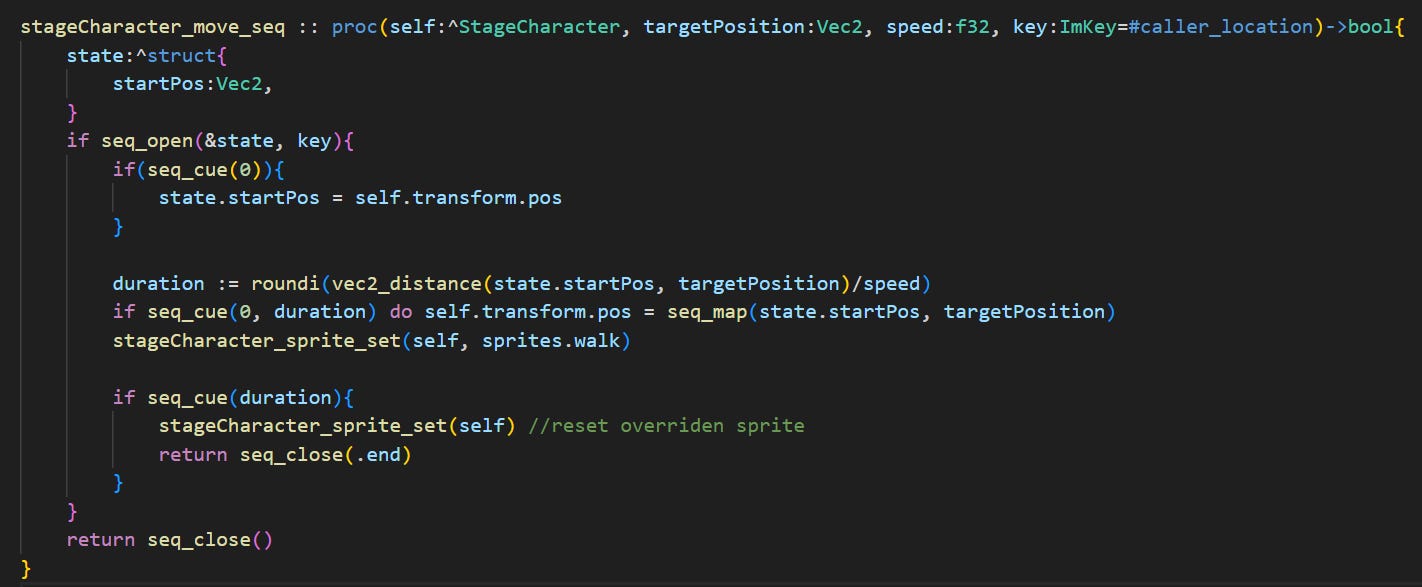
Let’s go over what happens here step-by-step:
The key is set to the caller location of this procedure. This allows me to call it multiple times at the same time (if I, say, want multiple characters to walk around at the same time) and get a different sequence context per caller.
A custom state is defined. This gets stored in the sequence’s context, is retrieved when the sequence opens, and is being used here to keep track of the character’s starting position.
The sequence is opened. This will add the new sequence’s context onto a context stack, which gets popped when the sequence closes. You might be wondering why this is a conditional, but we’ll get to that later.
If this is the first frame, the sequence records the character’s starting position.
The code here determines how long the movement should take, and smoothly moves the character between the start and target positions over the course of the sequence.
When the duration is up, the sequence ends, returning true.
I’ve now defined a “sub-sequence” that I can reuse inside any other sequence, like any other procedure. Very useful. But it doesn’t stop there…
Composing Sequences
Let’s look at another cutscene in the intro to see how useful composing sequences can be:
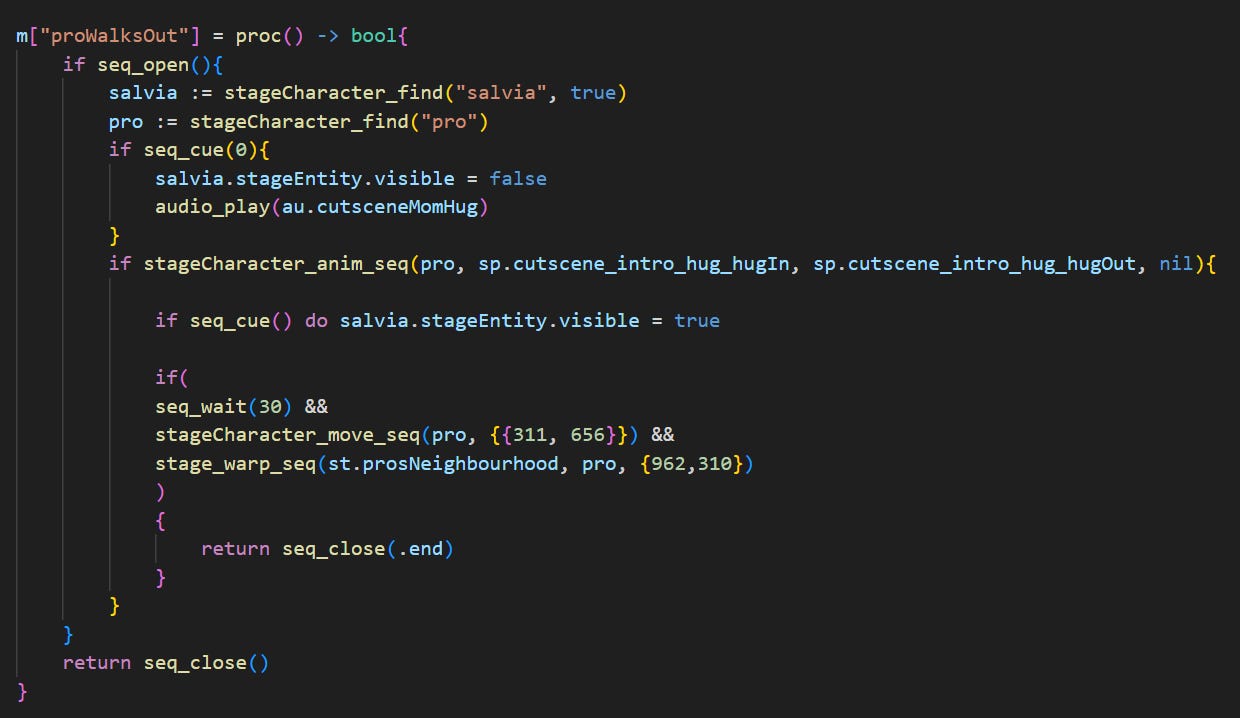
To start, I’ll clarify what actually happens in this cutscene, in order:
Pointers to the two stage characters involved (“salvia” and “pro”) are retrieved.
Salvia is set to be invisible.
Pro plays an animation of Salvia hugging him while a corresponding sound plays.
Salvia is set back to her visible idle animation.
Half a second passes.
Pro walks out of the doorway.
The game transitions to a new outdoor stage.
The cutscene ends.
The syntax here might seem a little odd, but the idea is simple. For more complicated sequences like this, I do away with direct seq_cue calls, and instead call a series of sub-sequences in order. If you remember from earlier, I wrap the actual sequence code in those sub-sequences in a conditional check. This is to make it so that when a sub-sequence ends, it continuously returns true until the base sequence ends. That is, if a sequence detects that it is a sub-sequence when it ends, it will flag itself as ended but not free its state. The next time I try to open that sub-sequence, seq_open will notice it has ended and return false, skipping its code, and the subsequent seq_close call will return true to indicate the sub-sequence has ended3.
Er… that was a bit of a mouthful. The important thing to remember is that the sub-sequence procedures here will keep returning false until they’ve run their logic once, then just keep returning true until the cutscene ends.
That means I can do something like this:

To run three sub-sequences, one after the other. Thanks to boolean short-circuiting, until the first expression here returns true, the rest don’t run, and so on.
Since I don’t know exactly how long some of these sub-sequences will take, rather than having them return a time value I can plug into seq_cue, I can do this for one-off code:

Which will just create an empty sub-sequence that closes immediately, returning true the first time it’s called, then false thereafter:

There are many little tricks like this for all sorts of use cases:

Conclusion
While this system is not quite as ergonomic or legible as I would like (the highly nested conditionals are a bit unintuitive and awkward to read if you’re trying to reason through this as normal code, for one), it makes up for it by being highly integrated with the rest of the game code, extremely versatile, and able to slot in practically anywhere4. I use it for special particle effects5, actions in combat6, generic transition effects, and more. It also took much less effort to implement than I suspect the alternative solutions I listed above would have taken. Though… the real test will be to hire someone else to work on cutscenes and see how well they can wrap their head around the system. Do you think it’ll go well?
As always, you can check out the latest backer update to vote on the next post’s topic! See you next devlog!
There are, of course, more and less complicated ways of doing this. Many games decouple their “rendering” loop from their “physics” loop, choosing to run things like the camera and animations as fast as possible while precise game physics run at a fixed “tick-rate” (20, 30, or 60 ticks per second are all common). The simplest common game loop is just input collection, physics logic, then rendering, 60 times per second.
The caller location is just a string made up of a file path, line, and column; information determined at compile time. While it is used by default, differing custom string or integer keys can also be passed to create multiple “instances” of the same sequence.
Sub-sequences are placed in a pool with the base sequence, which is freed when that sequence ends.
Since sequences can be defined as regular procedures, I can pass whatever I want to them without needing to “expose” it like I would have to with a more externalized system.
For example, a damage number effect that floats up while incrementing quickly, flashes red and displays the final value, then slowly fades out.
The generic “resolve action” sequence pans the camera to the appropriate location, displays the action’s name, then runs the specified action’s custom sub-sequence.