

Buckle up kids, time to learn how I made THIS:
This will be the greatest devlog—in the series of devlogs I’m making for the Diorama Break Kickstarter—yet!!
Early Stages
Since I knew the demo’s environments would feature a lot of trees, I figured that having a way to “cheaply” place varied, animated foliage around would help us a lot with saving on environment art load and keeping the environments visually interesting1. I also figured that, since the appearance of trees in real life is the result of fairly comprehensible stochastic/fractal processes, recreating something like that procedurally would be doable and likely produce results that felt “natural” without much additional effort.
The first steps involved developing a simple random algorithm for generating a “branch”:
Start from a “root” node, and assign it a starting “decay” value and random direction.
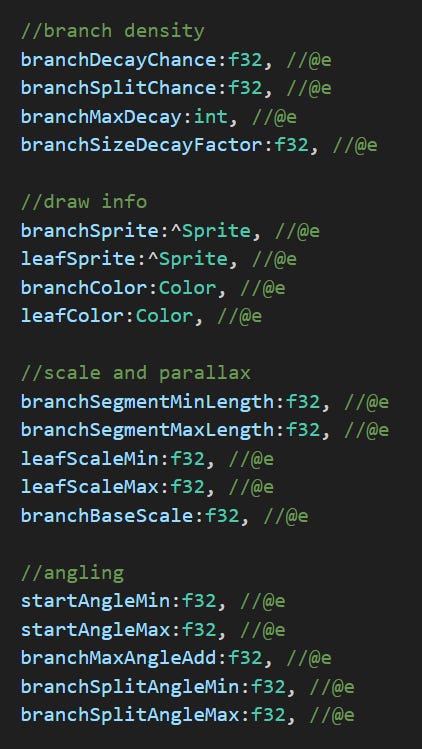
Pick a new direction slightly randomly offset from the node’s direction. You will now create one or more child nodes. Roll a random value to decide first whether to “split”, “decay”, or do nothing:
If you “split”, create two new child nodes slightly offset from the chosen direction in opposite directions, both with a “decay” value reduced by 1.
If you “decay”, create a new node in the chosen direction, with a decay value one less than the parent.
If you do nothing, do the same as b., but set its decay value the same as the parent’s.
Repeat step 2 for every new node, unless its decay value is 0, at which point it is considered a “leaf” node and gets no children.
Funnily enough, the resulting data structure would totally be described in computer science terms as a “tree”, making the normally abstract terms used to talk about said structures (branches, roots, leaves, etc.) hilariously literal in this case.
Anyway, once I had this structure, I could render it in game. All the trees rendered this way actually just use a single branch and leaf sprite, simply varying the size and rotation. With just the root node’s position, as well as the decay value and relative angle of it and every other node, I can derive the position and rotation of every sprite to draw by traversing the structure recursively (lower decay values have a smaller scale and offset, causing the tree branch to “taper off”, and decay values of 0 draw the leaf texture instead of the branch).
I continued to mess with the constants for random variables—stuff like angle ranges, starting decay value, chance of splitting/decaying—until I had something I was satisfied with for a single branch.
At that point, I began to work on animation. My idea would be to be able to assign a “wind force” to each node, and make them springy, so that they would sway back and forth. Wind force could then be applied at random throughout the branch to give the impression of random gusts. Thanks to the way I re-derive the position and rotation of every node every time the branch is rendered, force can be applied to the relative angle of a single node, and the angular change will “propagate” to all its children.
Overall this idea worked out, though it took hours of staring at footage of trees on windy days (as well as the trees outside my window) and a lot of tweaking to get just right2:

Full Background
Now that I had nice-looking animated branches, I could begin populating the background. First step was to just spawn in a bunch of branches:
Not bad, but this was immediately taxing on my PC, so it was time for some optimization! At first I was just drawing every branch and leaf node individually, so the obvious thing was to construct a proper mesh first, then push the entire thing to the GPU in a single call.
Handling the final render positions in my own code had a few, uh, false starts…
Got it working eventually though, at which point I could start layering branches of different size and color to create more of an illusion of depth:
And to complete the effect, a parallax offset for each layer:
Getting the exact distribution and branch size for each foliage layer also took some tweaking, but I’m pretty happy with the results!
Final Touches
And that’s where I left it, for the most part. Some more optimizations came after, particularly culling, though the effect is still not as performant as I’d like it to be. I think the big win will be in translating all the animation logic into shader code, so that a lot of that work can be done on the GPU and I don’t have to push these giant meshes (hundreds of thousands of vertices!) to it every frame, but that’ll have to wait until work on the full game begins.
We also ended up adjusting the colors to have the leaves match the branches, creating a more “silhouetted” look which distracts less from the foreground. Here’s that final iteration of the effect, straight from the demo:
“But wait!”, I hear you wail, “This is not the only animated foliage in the demo! What about the rest!?”
Ah, dear player, you will surely be raptured to hear that Diorama Break has, in fact, a second, entirely separate foliage system for foreground trees! That’s right!! But alas, my time here today is limited, so remember to vote for it as the next devlog topic in our latest backer update to get another sweet, sweet foliage fix. Until next time!
Not having to animate this sort of thing by hand was the big win I was looking for here. Generating an articulated “mesh” in code would allow me to treat the animation process more like puppetry than drawing, which is much easier to automate. Also, initially, this was just meant for Stroma’s background, but this thinking was applied to foreground stuff later on too.
One thing I was especially proud to get right was individual leaves sometimes wiggling around much more strongly, which is something you’ll notice is almost always present if you really stare at tree footage. To achieve this, leaves were assigned their own separate set of wind variables to be able to react to wind differently, as well as an extra variable that controls the extra chance of these “strong gusts” for them.
Man H.264 is not kind to small moving pixels. Still, looks great!
WE NEED MORE TREES